
See the planning portal, screen by screen
Every screen your couples get after booking — the countdown dashboard, the running order, the music lists, the guest request system and more. This is the same system, branded for Merseybeatz.
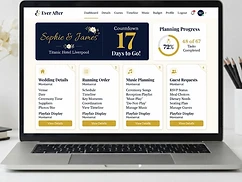
Planning Hub Overview
The couple's private dashboard — live countdown, planning progress, and one-tap access to every section. Branded for Merseybeatz, connected to the DJ.
- Live countdown to the wedding day
- Planning progress at a glance
- Every feature one tap away
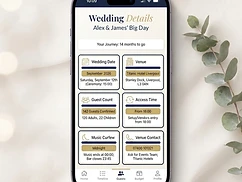
Wedding Details
Venue, date, guest count, access and curfew — every essential in one place, shared with the DJ, saxophonist and venue coordinator.
- Venue and date always visible
- Access and load-in notes
- Curfew and licence constraints flagged
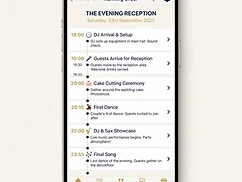
Running Order
A minute-by-minute timeline of the evening — every moment, cue and service placed in time. The DJ's single source of truth on the night.
- Editable times, titles and notes
- Every service placed in context
- Shared with the whole team
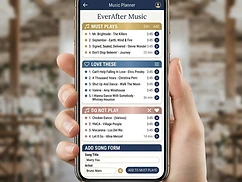
Music Planning
Must Play, Love These and Do Not Play lists built with real track search. The DJ sees every list — and Do Not Play tracks are auto-flagged if a guest requests them.
- Search real track metadata
- Do Not Play protection
- Priority-ordered must-plays

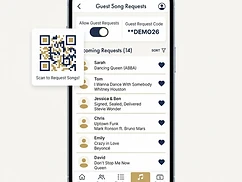
Guest Requests
Guests scan a QR code at the venue and submit requests — no app, no login. The DJ approves, holds or declines every track live.
- QR code at the venue
- Live status on every request
- Do Not Play auto-flagged

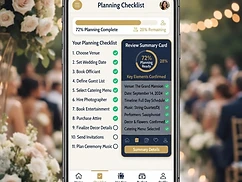
Checklist & Review
A guided checklist tracks progress right up to the day, and the Review screen confirms everything is in place — the green light before the wedding.
- Guided planning actions
- Live completion tracking
- One final 'ready' summary

Ready to explore it for real?
The live demo is fully interactive — edit the timeline, build a music list, toggle guest requests. Demo event: Sophie & James · Titanic Hotel Liverpool · 0 days to go.